
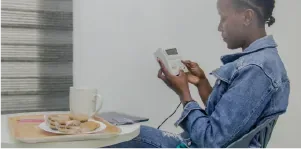
How to Load a Prepaid Meter Token (STS Keypad Meters)
Topping up a prepaid electricity meter takes about a minute once you know the routine. This guide covers the generic steps for an STS keypad meter. Key labels and menu prompts differ between models, so always follow the instructions that came with your meter if they differ from what is written here.
If you are new to prepaid power, start with our overview of [prepaid electricity meters in Uganda](/prepaid-meters-uganda) and then come back to this checklist.
Before you start
- Have your meter number ready. It is printed on the meter and on the receipt you give your vendor.
- Pay your vendor and keep the receipt. A valid STS token is a 20-digit number.
- Check that the meter display is on. If it is blank, check that power is reaching the meter before you blame the token.
Steps to load a token
- Wake the display and, if your model needs it, press the key that opens token entry.
- Type the 20 digits slowly, in the same order as printed. Many meters accept the digits in groups of four or five and do not need spaces.
- Press the confirm or enter key and wait for the meter to check the token.
- Look for the confirmation: most meters beep or show a message such as accepted, and the balance goes up.
- Check the new balance and keep the receipt until you are sure the credit has loaded.
The meter does the verification. A token is encrypted for one specific meter and can be used only once, which is why the same number cannot be loaded twice or on a neighbour’s meter. Our explainer on [what an STS prepaid meter is](/news/what-is-an-sts-prepaid-meter) goes into the detail.
If the meter rejects the token
A rejection nearly always has a simple cause. Work through these in order before calling anyone.
- A typing slip. Clear the entry and type all 20 digits again, one by one.
- A token for a different meter. Check that the meter number on the receipt matches the meter in front of you.
- A token that was already used. The meter will refuse a number it has loaded before.
- Several wrong attempts in a row. Some meters lock token entry for a while after repeated failures, so wait a few minutes before trying again.
If none of these explains it, contact the vendor who sold you the token, with the receipt and meter number to hand. They can check the sale in the vending system.
What the display tells you
A keypad meter such as the [PRW-SP-110](/products/prw-sp-110) shows your balance and can show voltage, current and power on its LCD. It warns you as credit runs low so you can top up before supply is cut, and at zero credit the relay disconnects automatically. Overdraft or emergency credit, where it is configured, can bridge a short gap while you buy a new token.
Modular meters such as the [PRW-SP-150](/products/prw-sp-150) work the same way for the customer, and add event logs and tamper detection for the operator.
Split meters: entering the token indoors
With a split meter such as the [PRW-SD-110](/products/prw-sd-110), the measuring unit sits in the secure meter room and you enter the token on the indoor customer interface unit, the [PRW-CIU-110](/products/prw-ciu-110) or [PRW-CIU-120](/products/prw-ciu-120), instead. The CIU has its own keypad and a backup battery, so you can still load a token during an outage. The steps are the same: type the 20 digits, confirm, then check the balance on the unit. Our guide to the [split DIN-rail meter with an indoor display](/news/split-din-rail-meter-with-ciu) explains how the two parts communicate.
Good habits
- Buy tokens only from your authorised vendor or channel, and keep the receipt.
- Never share a token before you have loaded it.
- Top up when the low-credit warning appears rather than waiting for supply to cut.
- Keep the meter display and keypad clean and dry.
Need help choosing a meter or setting up vending for a building? [Request a quote](/quote) or call our Kampala team on +256 703 353 316.
More news
What Is an STS Prepaid Meter and How Does It Work?
STS is the international standard that lets customers buy electricity credit as a secure 20-digit token. Here is how an STS prepaid meter works.
Read more

Prepaid vs Postpaid Electricity Meters: Which Is Right for You?
Prepaid meters collect payment before use; postpaid meters bill afterwards. Here is how to decide which suits your home, tenants or business.
Read more